Your Call Forwarding Settings
If you need to briefly leave, you can forward any incoming calls to another destination.
✔ This can be helpful for forwarding calls to another cellphone or an answering center when your mobile device is unavailable.
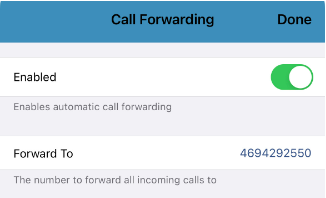
To view your app's call forwarding settings…
- Visit the Keypad
 tab.
tab. - Tap the Settings
 icon.
icon. - Select Preferences.
- Tap Call Forwarding.
Enable Call Forwarding
To enable forwarding for your calls, tap the Enabled toggle.

In the Forward To box that appear, type the phone number that will accept the forwarded calls.

✔ When a call is forwarded, the call will be marked as FORWARDED in the History  tab.
tab.