User Scopes
A user's view of the portal and the settings they can adjust are determined by their User Scope.
These scopes have pre-defined names and privileges. Office Managers, Site Manager, and Call Center Supervisor have more flexibility regarding the view of the users.
The User Scopes for Primecall include…
- Office Manager – This scope provides access to all information related to the domain that they belong to.
✔ This is the highest Admin privilege for PrimeCall Customers.
If you would like a user to be set as an Office Manager, please have your account's owner or main contact get in touch with our technical support team.
- Site Manager - This scope is similar to the Office Manager scope, except that the user will only be able to access and manage information related to their Site.
Quick Tip: The Site for a user can be set in each user's Profile Settings.
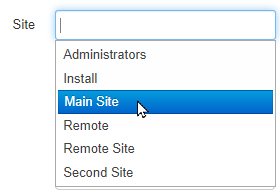
Functional users like Auto Attendants, Call Queues, and Conferences, can also be designated for a certain site.
The Call History and Inventory pages will have limited views for Site Managers based on the Site.
- Call Center Supervisor – This scope provides access to all Call Queues and Call Center Agents that the user is managing.
Quick Tip: The Call Center Supervisor's portal view can be modified by an Office Manager in the Call Center tab of their User Settings.
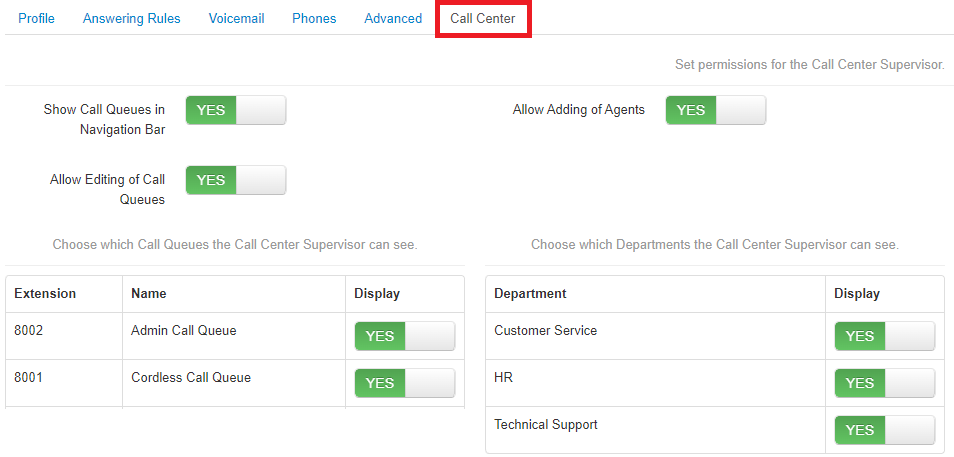
Use this tab to adjust what information a Call Center Supervisor can see and manage.
- Basic User – This scope provides access to information for that user only.
Note: Basic users can also see any shared information, such as Shared Contacts (set by a Call Center Supervisor, Site Manager, or Office Manager) and Shared Time Frames (set by a Site Manager or Office Manager).
- Call Center Agent – This scope has the same access level as Basic User; however, they can also view information for the queues they are set as an agent in.